How to Become a Mentor on OneOnOnes: Step-by-Step Guide
Learn how to create your mentor profile on OneOnOnes, add session offerings and start receiving bookings from aspiring students.
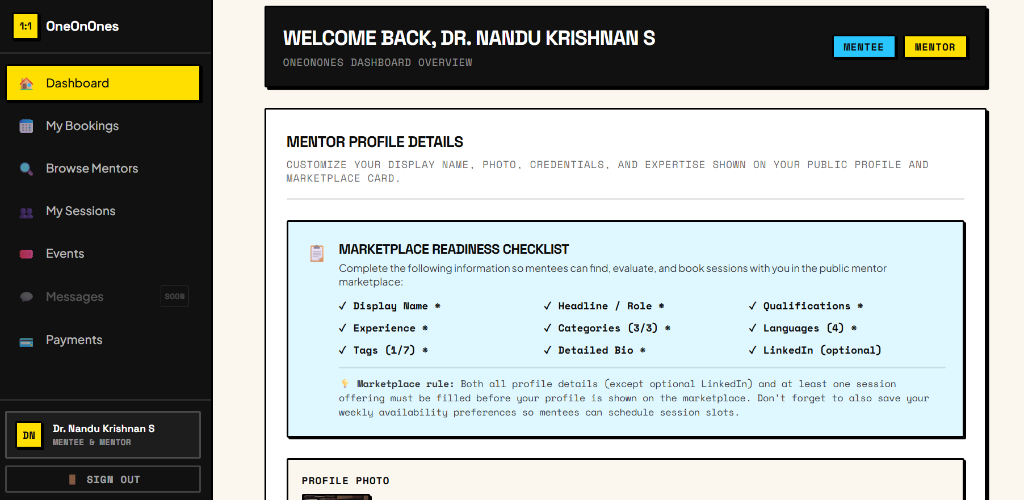
Becoming a mentor on OneOnOnes is simple, transparent, and takes only a few minutes. Whether you are an exam topper, a medical student who navigated NEET, an engineering student who cracked JEE, or someone who recently cleared a tough competitive test, your lived experience is valuable.
Through online mentorship, mentors can create their profiles, list their areas of expertise, set up custom session offerings, and start receiving 1-on-1 bookings directly from aspiring students across the country. This student mentorship model ensures juniors get authentic, honest guidance while mentors are fairly compensated for their time and insights.
Here is the complete walkthrough on how to set up your mentor profile and go live on the OneOnOnes marketplace.
Watch the Video Walkthrough
Prefer watching? Follow this quick walkthrough to set up your mentor profile.
Step 1: Sign in to OneOnOnes
Getting started takes just a few clicks:
- Visit oneonones.in on your desktop or mobile browser.
- Click the Become a Mentor tab located in the top navigation header.
- Sign in using your Google account for secure, password-free authentication.
- Authorise your account to immediately access your personal mentor dashboard.
Once signed in, you will be welcomed into your dashboard where you can manage your mentor profile, availability, bookings, and payout details.
Step 2: Complete Your Mentor Profile
When you first open your mentor dashboard, you will be guided by the Marketplace Readiness Checklist. This checklist outlines the essential profile criteria that must be fulfilled before your card can appear publicly on the OneOnOnes mentor marketplace.
Click on the Profile tab and complete the following details:
- Languages: Select the languages you can comfortably communicate in (e.g., English, Hindi, Malayalam, Tamil, Telugu, etc.). Mentees often prefer mentors who can explain concepts in their native language.
- Areas of Expertise: Select the competitive exams or subjects you can mentor students in. Whether you are a NEET mentor, JEE mentor, BITSAT achiever, or board exam guide, choosing accurate tags helps relevant aspirants discover you.
- About You: Write a concise, genuine introduction describing your background, the exams you sat, your preparation journey, drop years or retries, and how you can specifically help aspirants with realistic strategies.
- LinkedIn Profile: Add your LinkedIn profile URL (optional, but recommended for added verification).
Important: All fields except the LinkedIn profile URL are mandatory. Your profile requires languages, expertise areas, and an "About You" section to be considered complete.
Once you have filled in your details, click Save Profile to lock in your changes.
Step 3: Create Your First Session Offering
A complete mentor profile needs at least one active offering so students know what they can book with you. In your dashboard, locate the Offerings manager and select Add Offering.
Enter the following session details:
- Title: Give your session a descriptive title that clearly states the call's purpose (for example, "1-on-1 NEET UG Drop Year Strategy & Mock Analysis" or "How to Balance Board Exams with JEE Preparation").
- Duration: Specify the session length (e.g., 30 minutes, 45 minutes, or 60 minutes).
- Price: Set your session fee in INR. Mentors retain complete freedom over their own pricing.
- Date: Add your availability and date so aspirants can choose slots that align with your schedule.
- Description: Explain what students can expect from the session—such as personalized timetable audits, book recommendations, drop-year mindset coaching, or live doubt clearing.
Once completed, click Save Offering to add it to your profile.
Step 4: Your Profile Goes Live!
Once your mentor profile is complete and at least one session offering has been saved, the Marketplace Readiness Checklist is fulfilled. Your profile immediately becomes visible to thousands of students on the public OneOnOnes Marketplace!
Students visiting your profile can:
- View your profile and introduction: Read about your lived exam experiences and mentorship philosophy.
- Check your expertise and languages: Verify whether you cover their target exam and speak their preferred language.
- Visit your LinkedIn profile: View your verified academic and career credentials.
- Browse available session offerings: Compare session lengths, topics, and transparent pricing.
- Select a suitable date and book a session: Reserve a 1-on-1 slot and pay securely via Cashfree.
Whenever an aspirant books a session, you receive automated email notifications and calendar invites with meeting details directly in your dashboard.
Ready to Start Mentoring?
Share your experience, guide aspiring students and start connecting with learners on OneOnOnes.
Talk 1-on-1 with an Achiever
Articles give strategic direction, but your journey is unique. Schedule a focused 30- to 60-minute video session with someone who has actually done it.